
Boolean search strings enhance recruitment efficiency by combining keywords with logical operators (AND, OR, NOT) to refine candidate searches. Proper use of parentheses, quotation marks, and wildcards is essential for achieving precise results, while iterative testing of strings can prevent irrelevant outcomes. Recruiters should build tailored search templates and adjust them based on platform-specific syntax to optimize sourcing efforts.
- Using precise Boolean strings with correct operators and grouping dramatically improves candidate relevance and reduces time spent reviewing irrelevant profiles.
- Adding parentheses ensures logical operators evaluate in the intended order, preventing unintended broad or narrow results.
- Testing each wildcard stem separately helps prevent unrelated results from polluting the search, ensuring more accurate candidate pools.
- Platform-specific differences mean Boolean syntax may vary, so testing simple strings on each platform avoids ineffective queries.
- Building and maintaining role-based string templates and iterating searches with a structured approach yield the best sourcing outcomes.
In this article
A Boolean search string combines keywords with logical operators, AND, OR, and NOT, to narrow or widen your search results with precision. For recruiters, that precision is the difference between wading through hundreds of irrelevant resumes and landing on a tight shortlist of qualified, often passive, candidates who never applied to anything.
What Are Boolean Search Strings?
A Boolean search string is a query built from keywords connected by logical operators that tell a search engine or applicant tracking system exactly how to combine your terms. Instead of typing “software engineer Boston” and hoping the algorithm guesses your intent, you write a structured command: it must include this, it can include any of these, and it must exclude that.
The three core operators are:
- AND requires both terms to appear. “Python AND Django” only surfaces profiles mentioning both, cutting a broad pool of Python developers down to those with framework-specific experience.
- OR widens the net by accepting any listed term. Grouping title variants with OR, like “Recruiter OR Sourcer OR Talent Acquisition Specialist,” catches candidates who use different job titles for the same function.
- NOT excludes a term entirely. “Manager NOT Assistant Manager” filters out a common but unwanted variant. Used carelessly, though, NOT can strip out strong candidates who mention the excluded term in passing, say, a senior engineer who once “managed” a mentoring program.
Each operator changes your result size in a predictable direction. AND shrinks the pool, OR expands it, and NOT trims it. According to Boolean search guidance from the University of Illinois, these three operators, when combined with parentheses for grouping, form the entire logical backbone of advanced search across most platforms.
Quotes, Parentheses, and Wildcards That Sharpen Results
Operators alone only get you halfway. The modifiers around them determine whether your string actually behaves the way you intend.
Quotation marks lock in an exact phrase. Searching “project manager” as a quoted phrase returns that specific title, not resumes where the words “project” and “manager” appear separately in unrelated sentences.
Parentheses control the order of evaluation, and this is where most self-taught Boolean strings quietly break. Without grouping, a search engine may apply operators left to right instead of the way you intended. Writing (Python OR Java) AND (Engineer OR Developer) forces the engine to evaluate each OR set first, then combine them with AND, which keeps your logic intact.

The asterisk () works as a wildcard or truncation symbol. Attach it to a word stem, like manag, and it returns manager, management, and managing in one pass, according to MongoDB’s Boolean search guide. The catch: stems that are too short return noise. Searching “dev*” will pull developer, development, developing, and devote, which is rarely what you want.
Pro Tip: Test every wildcard stem on its own before adding it to a longer string. If it returns unrelated results in isolation, it will pollute the whole search once combined with other terms.
How Do You Write a Boolean Search String for a Role?
Building a usable string is a repeatable process, not guesswork. Recruiter-focused guidance on Boolean sourcing consistently points to a four-step approach that starts broad and tightens with each pass, an approach echoed in recruiter-focused Boolean guides.
- Collect title variants and group them with OR. Companies rarely agree on job titles, so “Software Engineer” OR “Software Developer” OR “SDE” catches candidates your exact-title search would miss.
- Add must-have skills with AND. If the role requires a specific stack, add it as a hard requirement: AND “Python” AND “AWS”.
- Add optional skills or buzzwords in their own OR group to broaden ranking, not to exclude. Nice-to-haves like “Docker” OR “Kubernetes” OR “Terraform” should sit in a separate OR cluster so a candidate missing one still surfaces.
- Exclude common noise with NOT, then test iteratively. Run the string, scan the first page of results, and adjust before assuming the search failed.
Here are ten ready-to-copy strings for common hiring roles:
- Software Engineer: (“Software Engineer” OR “Software Developer” OR “SDE”) AND (“Python” OR “Java”) AND (“AWS” OR “Azure”) NOT “Intern”
- Product Manager: (“Product Manager” OR “PM” OR “Product Owner”) AND (“roadmap” OR “backlog”) AND “agile”
- Data Scientist: (“Data Scientist” OR “ML Engineer”) AND (“Python” OR “R”) AND (“machine learning” OR “predictive modeling”)
- Sales Executive: (“Account Executive” OR “Sales Executive” OR “AE”) AND (“quota” OR “pipeline”) AND “B2B”
- Executive/VP: (“VP” OR “Vice President” OR “Head of”) AND (“Operations” OR “Sales”) AND “P&L”
- Marketing Manager: (“Marketing Manager” OR “Growth Manager”) AND (“SEO” OR “demand generation”) AND “campaign*”
- HR Business Partner: (“HRBP” OR “HR Business Partner” OR “People Partner”) AND (“employee relations” OR “talent management”)
- DevOps Engineer: (“DevOps Engineer” OR “SRE” OR “Platform Engineer”) AND (“CI/CD” OR “Kubernetes”) AND “AWS”
- Financial Analyst: (“Financial Analyst” OR “FP&A Analyst”) AND (“forecasting” OR “budgeting”) AND “Excel”
- Customer Success Manager: (“Customer Success Manager” OR “CSM”) AND (“retention” OR “onboarding”) NOT “Support Representative”
Fixing Empty or Noisy Results
Most broken searches aren’t broken logic, they’re overcorrected logic. An empty result set almost always means your string is too restrictive, not that the platform is malfunctioning. Loosen the tightest AND clause, drop the most specific requirement, or add a synonym you forgot to include in an OR group.
Common mistakes worth checking first:
- Typing operators in lowercase, which some platforms silently ignore instead of treating as commands.
- Skipping parentheses, which leaves operator precedence up to the engine’s default behavior.
- Over-relying on NOT, which can quietly exclude strong candidates who mention the excluded term for an unrelated reason.
- Misspelling a skill or tool name, especially with camel-case product names.
- Forgetting synonym groups entirely, so the string only matches one way of phrasing a skill or title.
According to MongoDB’s Boolean search resource, these exact errors, lowercase operators, missing parentheses, and NOT overuse, are among the most frequent reasons Boolean searches underperform, and they recommend a deliberate cycle of testing and tuning rather than a one-shot query.
The fix is procedural: start broad, inspect the first page of results, then tighten one variable at a time. If tightening produces zero results, undo the last change before adding another.
Do Boolean Operators Work the Same Way Everywhere?
They don’t, and this trips up more recruiters than any single operator mistake. Each platform interprets the same symbols differently, so a string that works flawlessly on one tool can return garbage on another.
- Google: treats multiple words as an implicit AND, uses a minus sign (-) instead of the word NOT, requires OR in uppercase to register as an operator, and supports quotation marks for exact phrases. Some legacy operators, including the plus sign, no longer function, according to Google’s own search operator documentation.
- LinkedIn and most ATS platforms: are typically case-sensitive for operators, and many don’t support wildcards or deep nesting with parentheses. Field-specific filters (title, location, current company) often outperform trying to force everything into one long string.
- Developer and database tools: like MySQL’s full-text boolean mode or Elasticsearch, assign different meaning to symbols such as + and -, and precedence rules vary by engine, according to MySQL’s Boolean full-text search documentation.
Run a simple two-term test string on any new platform before building something complex. It takes thirty seconds and saves an afternoon of troubleshooting a string that was never going to work on that system.
Boolean Search Cheat Sheet
| Element | What it does | Quick example |
|---|---|---|
| AND | Narrows results; requires all terms | Python AND Django |
| OR | Widens results; accepts any listed term | “Sourcer” OR “Recruiter” |
| NOT | Excludes a term (use sparingly) | Manager NOT Assistant |
| “Quotes” | Locks an exact phrase | “Product Manager” |
| (Parentheses) | Groups terms to control order | (Java OR Python) AND AWS |
| Asterisk (*) | Truncates a word stem | manag* → manager, managing |
Three habits separate recruiters who get consistent results from those who don’t: start broad and tighten gradually, save working strings as reusable templates by role, and test every string on the specific platform before trusting it. Avoid stacking too many NOT clauses, and never assume a hiring manager’s exact job title is the only title candidates use. A one-line pre-search checklist helps: does every OR group sit inside its own parentheses, and have you tested the string on this exact platform before?
How Careerscape Sourcers Build Boolean Strings in Practice
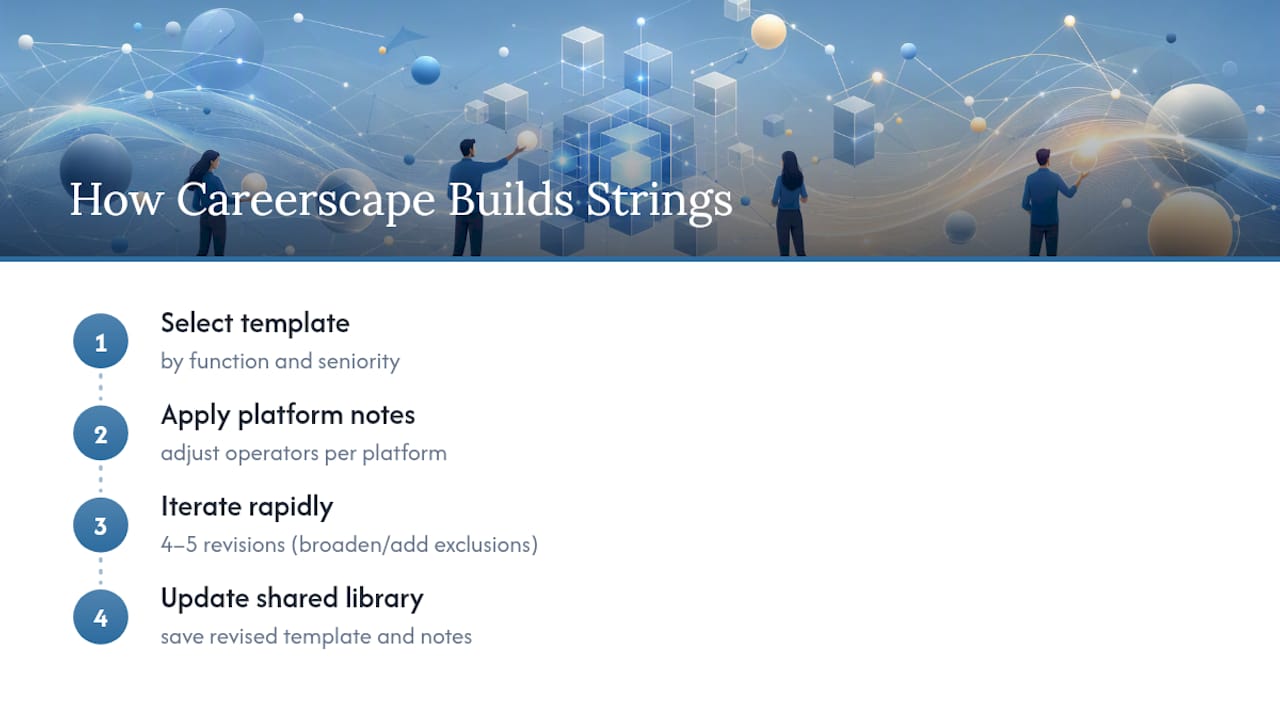
A sourcing team treats Boolean strings as living documents, not one-time queries. For a senior hire, a string built for “VP Operations” might go through four or five revisions in a single afternoon: broadening a title group after the first pass returns too few candidates, then adding an exclusion after noticing unrelated retail management profiles slipping through.
That iteration works better with structure behind it. A shared library of role templates by function and seniority is maintained, along with platform-specific notes on where a given operator behaves differently. That habit, paired with Careerscape’s industry-specialized recruiting experience, means a string built for a fintech engineering role starts from a different template than one built for a healthcare operations leader. If your team is sourcing without that kind of shared reference, it’s worth building one before your next search.
— Bradford
Where to Learn More About Boolean Syntax
For operator syntax and examples, consult the University of Illinois Boolean searching guide. For platform-specific rules, see Google’s advanced search documentation and MySQL’s full-text boolean mode reference for developer-side implementations.
If your team is ready to move past building strings manually and wants sourcing handled end to end, Careerscape’s contract staffing services and direct hire staffing services pair Boolean sourcing expertise with vetted candidate pipelines. For a specific opening, request talent support and a Careerscape recruiter will build the search from scratch.
FAQ
What Is a Boolean Search String?
A Boolean search string is a search query that combines keywords with logical operators, AND, OR, and NOT, to control exactly which results a search engine returns.
What Is an Example of a Boolean Search?
A simple example is (“Software Engineer” OR “Developer”) AND “Python” NOT “Intern,” which finds engineering profiles that mention Python while excluding internship listings.
How Do You Write a Boolean Search String?
Start by grouping job title synonyms with OR, add required skills with AND, place optional skills in their own OR group, and exclude irrelevant terms with NOT, testing after each change.
What Does the Asterisk (*) Mean in a Boolean Search?
The asterisk works as a wildcard or truncation symbol, so attaching it to a stem like manag* returns manager, management, and managing in a single search, according to MongoDB’s Boolean search overview.
Do Boolean Operators Work the Same on Every Platform?
No. Google uses a minus sign for exclusions and requires OR in uppercase, while many ATS and LinkedIn searches are case-sensitive and don’t support wildcards, so testing a short string first on each platform is worth the extra minute.
Recommended
- Steps to Effective Job Posting for Recruiters in 2026
- 9 Proven Ways to Attract Top Talent in 2026
- Job Posting Optimization: A 2026 Recruiter’s Guide